| 86 | Software | Q. How it works IDIS Mobile Camera Auto Log-In | 2022-11-10 |
|
A.
Q. If the mobile phone is in the WIFI, user can use Auto Login option. However, it seems that auto log-in is not working when the IDIS Mobile Camera App comes up from the Background.
A. if the App comes up within 10 seconds after app goes background, the screen comes out as it is. After that, if user again runs the Mobile App, it will be auto log-in |
|||
| 85 | Software | Q. How many NVRs can be registered to the Mobile App ? | 2022-11-10 |
|
A.
A. There is no specific limitation, Our LAB tested registration upto 4000 NVRs. |
|||
| 84 | Software | Q. There is no change in Device Name in the IDIS Center | 2022-11-10 |
|
A.
A. The IDIS Center manages device names if the Device Name Sync is unticked. In this case, even if user changes the device name, IDIS Center shows the existing device name.
"Setup > Double Click the Device > Edit Device > Tick/Untick Device Name Sync"
|
|||
| 83 | Software | Q. What is Device Low Bandwidth Communication on ISS ? | 2022-11-10 |
|
A.
A. It is used for seamless communication even in low bandwith network. However,, if "Device Low Bandwidth Communication" is enabled, it is not effective in the normal network because it trys handshake communication between the device and client.
|
|||
| 82 | Software | Q. The security level of Intelligent TLS on IDIS Solution Suite | 2022-11-10 |
|
A.
A. Intelligent TLS is a level similar to TLS Very High level (Exclude Multimedia SSL). |
|||
| 81 | Software | Q. ISS license registration modes and how they work | 2022-11-09 |
|
A.
A. 1. Online Mode : Initial access to the License Server once, then no need to connect it. After Verificatioin the License Key, internet is not required.
2. Offline Mode : Input the key without Internet.
3. Cloud Mode : It has to keep opening internet access, because Admin service keeps connection to the license server every day. limited time is 24 hours. If the network is disconnected and flows without recover it, ISS services goes out (Status : Demo Expired) if the ISS service restarts. |
|||
| 80 | Software | Q. Characters and Menus are too small to read when launching IDIS Client on 4K monitor | 2022-11-08 |
|
A.
A, Go to Menu > Preference > System Untick "Disabled display scaling on high DPI settings". |
|||
| 79 | Software | Q. Recorder Storage Information in IDIS Center | 2022-11-08 |
|
A.
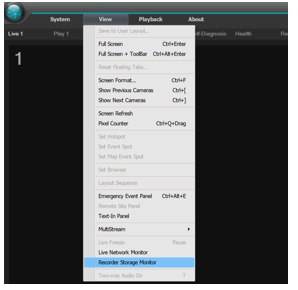
A. Go to Menu > View > Recorder Storage Monitor. In that menu, all storages connected to recorders will be displayed.
|
|||
| 78 | Software | Q. The limitation of ISS Client Log-in List | 2022-11-08 |
|
A.
A. There is no specific limitation numbers of Log-in List. |
|||
| 77 | Software | Q. The protocol that ISS supports | 2022-11-08 |
|
A.
A. IPv4, IPv6, RTP/RTSP/TCP, RTP/RTSP/HTTP/TCP, RTP/UDP RTSP/TCP, HTTP, HTTPS, SMTP, FEN, mDNS |
|||
| 76 | Software | Q. Does the ISS support SAN(Storage Area Network) ? | 2022-11-08 |
|
A.
A. Yes, ISS supports SAN. |
|||
| 75 | Software | Q. What is MiniBankPlayer.exe program in IDIS Center folder ? | 2022-11-08 |
|
A.
A. The MiniBankPlayer.exe is a SelfPlayer that plays recorded videos of old IDIS Recorders. It is a previous software of the current Clip Player. It is not a software that has viruses or affects security. |
|||
| 74 | Software | Q. The Record Color Bar meaning in IDIS Client | 2022-11-03 |
|
A.
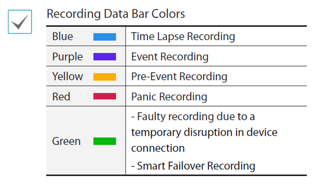
A. Various meanings are given to the colors of the IDIS record bar.
|
|||
| 73 | Software | Q. I am a user using the Person Match service and I have a question. To use the Pre-Processed Footage method, when using MariaDB in DV-3100, can I add multiple HDDs and use RAID? | 2022-11-02 |
|
A.
A : RAID should not be used in DV-3100, and only one HDD is allowed to store DB. |
|||
| 72 | Software | Q. How many license plate images can be stored in ANPR Event Popup(IDIS Solution Suite Client)? | 2022-11-02 |
|
A.
A. Up to 1000 can be stored in IDIS Solution Suite Client, after 1000, license plate images are overwritten from the oldest. |
|||