| 17 | Camera | Q. How to apply privacy masks on an IP camera | 2015-07-06 | ||||||||||||||||||||||||||||||||||||
|
A.
Privacy masks is a feature that masking some area where the user doesn’t want to show. |
|||||||||||||||||||||||||||||||||||||||
| 16 | Camera | Q. How to upgrade IP camera's firmware | 2015-07-06 | ||||||||||||||||||||||||||||||||||||
|
A.
The firmware files are different from each type of camera. 1) From DirectIP NVR 2) From IDIS Discovery |
|||||||||||||||||||||||||||||||||||||||
| 15 | Camera | Q. What is the IK rating? | 2015-07-06 | ||||||||||||||||||||||||||||||||||||
|
A.
The IK rating classifies the level of protection that electrical appliances provide against mechanical impacts from outside. It is defined by standard IEC 62262. The degree of mechanical protection is identified by a code that consists of the letters IK followed by two digits:
|
|||||||||||||||||||||||||||||||||||||||
| 14 | Camera | Q. How to display an analog video (CVBS) output of an IP camera? | 2015-07-06 | ||||||||||||||||||||||||||||||||||||
|
A.
Some Network cameras have CVBS analog video output port so it can be seen through a portable monitor. In the case of WDR camera, |
|||||||||||||||||||||||||||||||||||||||
| 13 | Camera | Q. RTSP stream commands of IDIS IP cameras | 2015-07-06 | ||||||||||||||||||||||||||||||||||||
|
A.
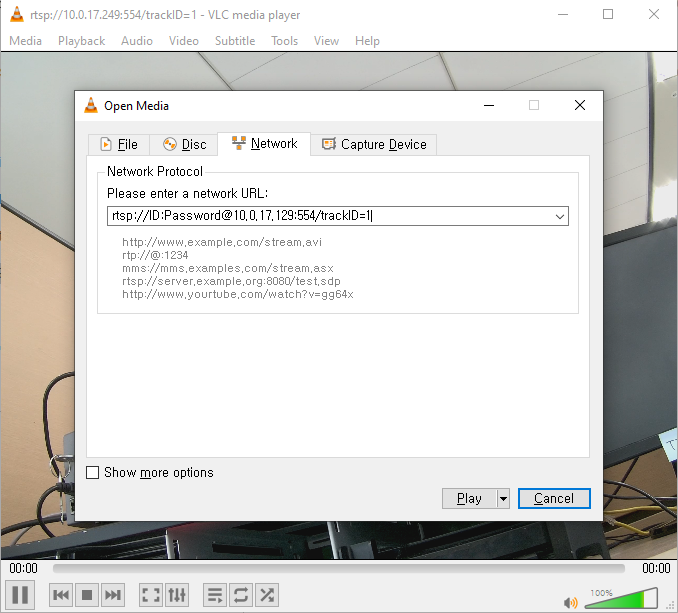
To receive stream via RTSP(Real Time Streaming Protocol), RTSP player is required. VLC player is one of the most popular players.(http://www.videolan.org/) The command line for playing remote live video via RTSP is below. rtsp://ID:Password@IPaddress:RTSP port number/trackID=‘channel number
Please refer to the capture below for an example.
|
|||||||||||||||||||||||||||||||||||||||
| 12 | Camera | Q. Which infrared-ray wavelength is used with IR Camera? | 2015-07-06 | ||||||||||||||||||||||||||||||||||||
|
A.
850nm Infrared-ray is illuminated from the IR-LED. In general, humanity can see wavelength up to 780nm (visible light wavelength: 380nm ~ 780nm) |
|||||||||||||||||||||||||||||||||||||||
| 11 | Camera | Q. What is Smart IR? | 2015-03-23 | ||||||||||||||||||||||||||||||||||||
|
A.
Normally, when a camera uses infrared LED arrays for wide-area illumination at night, you may see the overexposure image when the object is closed to the IR camera. |
|||||||||||||||||||||||||||||||||||||||
| 10 | Camera | Q. Can I use DirectIP cameras with other 3rd party NVRs? like Milestone? | 2015-03-23 | ||||||||||||||||||||||||||||||||||||
|
A.
If you wish to connect DirectIP cameras to non-DirectIP NVR or VMS, you should change the DirectIP camera’s protocol to ONVIF protocol using our INIT (Integrated Network Installation Tool) software. If the cameras are rebooted after the protocol change, the DirectIP camera will operate as an ONVIF camera. |
|||||||||||||||||||||||||||||||||||||||
| 9 | Camera | Q. Do DirectIP cameras have spot output? | 2015-03-23 | ||||||||||||||||||||||||||||||||||||
|
A.
Many DirectIP cameras have spot output. By spot output, the image can be seen during the installation in the NTSC/PAL D1 resolution. But, some cameras do not support spot output. So, you should check whether your cameras support spot output or not. |
|||||||||||||||||||||||||||||||||||||||
| 8 | Camera | Q. There are Alarm In/Out ports on the DirectIP cameras. Do DirectIP NVRs work with this? And then how? | 2013-04-28 | ||||||||||||||||||||||||||||||||||||
|
A.
Some DirectIP cameras have built-in alarm in/out ports. Normally, alarm input has TTL voltage level and NC/NO programmable. Alarm output only supports the NO mode with relay output. Regarding the alarm in/out specifications, you can connect your alarm devices such as a smoke sensor or fire alarm to the alarm in/out port on the DirectIP camera. |
|||||||||||||||||||||||||||||||||||||||
| 7 | Camera | Q. How can I configure DirectIP NVRs and cameras ? | 2013-04-28 | ||||||||||||||||||||||||||||||||||||
|
A.
DirectIP cameras can be configured by IDIS Discovery software and DirectIP NVRs. Our software helps to find and configure your camera fast and easy. If DirectIP cameras are connected to DirectIP NVRs, you can easily configure multiple DirectIP cameras on NVR’s setup menu. If you set multiple camera configurations on NVR, all changed parameters will be passed to each DirectIP camera immediately. |
|||||||||||||||||||||||||||||||||||||||
| 6 | Camera | Q. Do DirectIP cameras have OSD menu? | 2013-04-28 | ||||||||||||||||||||||||||||||||||||
|
A.
No. DirectIP cameras have no OSD menu. So, you should configure the DirectIP using IDIS NVR, IDIS Solution Suite, IDIS Center, or IDIS Discovery software. |
|||||||||||||||||||||||||||||||||||||||
| 5 | Camera | Q. Can I get the same level of performance with 3rd party IP cameras - not using DirectIP protocol? | 2013-04-28 | ||||||||||||||||||||||||||||||||||||
|
A.
It’s difficult to get the same level of performance with 3rd party cameras. Generally, concerning transmitting video streams to DirectIP NVRs, 3rd party cameras have lower performance than DirectIP cameras. That is because DirectIP protocol has specific multiple stream channels and their video profile and frame rate adjustment technology to satisfy optimal performance of video data transmission for live monitoring, recording, playing, and remote transmitting. So, if you connect 3rd party cameras with IDIS NVRs, the benefits of DirectIP protocols disappear. |
|||||||||||||||||||||||||||||||||||||||
| 4 | Camera | Q. What does IRE mean when it comes with luminence for surveillance cameras? | 2013-04-28 | ||||||||||||||||||||||||||||||||||||
|
A.
IRE stands for Insitute of Radio Engineers and represents the composite video signal in percentage terms. That is, 100 IRE equals 100% full signal level which means 714mV amplitude active video signal. |
|||||||||||||||||||||||||||||||||||||||
| 3 | Camera | Q. What are ICR, TDN, and DDN? | 2013-04-28 | ||||||||||||||||||||||||||||||||||||
|
A.
ICR ICR (Infrared Cut Filter) is used with color CCD or CMOS image sensors to produce accurate color images. During the day, the camera uses an ICR to reflect or block mid-infrared wavelengths while passing visible lights. However, as light diminishes below a certain level, some cameras can automatically turn off ICR functionality to deliver high-quality, black and white image using infrared light.
TDN TDN (True Day/Night) technology supports night vision capability by implementing a physical ICR that is removed by a mechanical motor.
DDN DDN (Digital Day/Night) technology allows for viewing in both day and night conditions, without the use of an ICR. As light diminishes below a certain level, DDN technology switches color image to black and white image to offer similar benefits to TDN at a lower cost. At night, the captured image depends on the lighting and infrared waves off objects. |
|||||||||||||||||||||||||||||||||||||||