
Skip to Content

Intelligent Codec

Delivers up to 90% savings on storage and bandwidth,
providing faster, better searching of clearer images

Time and accuracy are of the essence in incident response, but typical video compression approaches can hinder the quick and efficient review of surveillance footage. Traditional industry approaches have meant jerkier images and challenges in the finding and review of critical moments. Such frustrations have been the accepted trade-off for the bandwidth and storage savings compression can provide. IDIS Intelligent Codec ends both the frustration and the trade-off once and for all, delivering faster, smoother searching with clearer images, and up to 90% savings on storage and bandwidth.

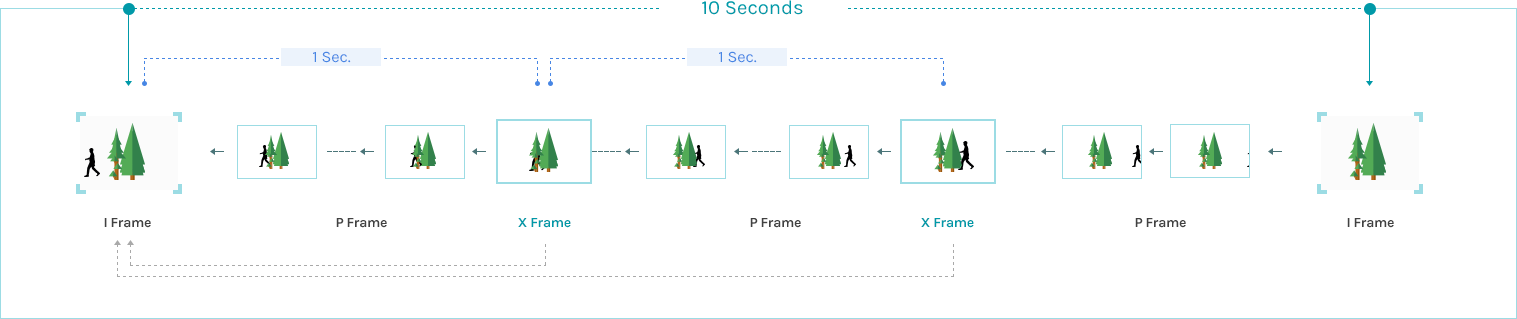
IDIS Intelligent Codec is advanced compression technology that dramatically enhances IDIS’s complete H.265 range of full-HD IP cameras and network video recorders (NVRs), which already deliver up to 30~50% bit rate reduction savings on storage space and network bandwidth. IDIS Intelligent Codec delivers up to 30~50% bit rate reduction on top of H.265, achieving a total up to 65~75% reduction for users. By leveraging of IDIS motion adaptive transmission (MAT) technology—which reduces the bit-rate by restricting transmission during live surveillance periods without movement—IDIS delivers a further reduction. From an H.264 baseline, IDIS Intelligent Codec plus MAT delivers a total savings of up to 90%, depending on scene and resolution. The less complex the scene and the less movement present, the greater the compression.

Lower Your Cost
of Ownership

See up to 90% storage savings via IDIS Intelligent Codec with Adaptive Transmission (MAT)

H.264
H.265
H.265 IDIS Intelligent Codec

(Saves up to 65~75%)

H.265 IDIS Intelligent Codec with MAT

(Saves up to 90%)

Search Faster than Ever Before

Faster and soother searches, minimizing distortion while reviewing complex scenes
Intelligent Codec
vs
Others

IDIS Intelligent Codec (save to 90%)
Other Camera Manufacturers

IDIS Intelligent Codec makes the complete IDIS H.265 range cost-effective, ensuring IDIS’s signature low total cost of ownership. The implementation of dual codecs (H.264/H.265) across IDIS’s entire H.265 range (including cameras, NVRs, and mobile apps) allows users to use H.264 for live monitoring on current hardware, while utilizing H.265 for recording, reducing storage requirements. This allows users of IDIS technology to enjoy the full benefits of IDIS Intelligent Codec, and ensures the IDIS H.265 range is backward compatible with prior IDIS technology, fulfilling the IDIS promise of future proof video surveillance. Another reason It’s Not the Same, It’s IDIS.

관리자홈 > 제품 관리 > 팝업 관리

홈페이지 팝업을 관리합니다.

이미지 교체든 설정 변경이든, 마지막엔 [설정 저장]을 눌러야 방문자에게 반영됩니다. (어느 저장 버튼을 눌러도 이 페이지의 설정이 모두 함께 저장되니 입력한 내용이 날아갈 걱정은 없어요) 이미지 파일명은 무엇이든 상관없어요 — 자동으로 고정 주소에 덮어쓰기됩니다.
💡 파일을 슬롯 위로 끌어다 놓아도(드래그앤드랍) 업로드됩니다.
📅월간 캘린더 팝업 (매월 자동)

아래에서 정한 날짜 범위(기본 매월 1~7일)에 자동으로 노출됩니다. 매달 새 캘린더 이미지로 교체만 해주면 돼요. 팝업 이미지를 클릭하면 '캘린더 원본'이 새 창으로 열립니다.

일 ~ 기본 1~7일 · 저장을 눌러야 반영
🖥 팝업 이미지 (PC) 현재 이미지 보기
📱 팝업 이미지 (모바일) 현재 이미지 보기
🗓 캘린더 원본 (PC, 클릭 시 열림) 현재 파일 보기
🗓 캘린더 원본 (모바일, 클릭 시 열림) 현재 파일 보기
🎉이벤트 팝업 (수동)

필요할 때 켜고 끄는 수동 팝업입니다. 켜져 있는 동안 모든 국내 페이지 우측 하단에 노출됩니다.

~ 비워두면 그쪽 제한 없음 (예: 종료일만 넣으면 그날까지 계속 노출 후 자동 종료)
🖥 팝업 이미지 (PC) 현재 이미지 보기
📱 팝업 이미지 (모바일) 현재 이미지 보기
💡 운영 팁
· 이벤트 팝업을 켜기 전에 PC/모바일 이미지를 먼저 업로드하세요. 이미지 없이 켜면 빈 팝업이 보입니다.
· 행사 일정이 정해져 있다면 노출 기간을 미리 넣고 [사용]으로 저장해두세요 — 시작일에 자동으로 뜨고 종료일 다음 날 자동으로 내려갑니다 (기간 판정은 한국 시간 기준).
· 매달 캘린더 교체 순서: 팝업 이미지 PC/모바일 + 원본 PC/모바일 4개 업로드 → [설정 저장] 꼭 누르기! 저장해야 이미지 캐시 버전이 갱신되어, 지난달 팝업을 봤던 방문자에게도 새 캘린더가 보입니다.
· [현재 이미지 보기]는 항상 방금 저장된 최신 파일을 보여줍니다 (캐시 없음).
· 홈페이지 방문자의 "오늘 하루 그만 보기"는 기존과 동일하게 동작합니다.
· 🧪 [테스트 노출]은 저장과 무관하게 지금 이 브라우저에서만 1분간 팝업을 강제로 보여줍니다 — 이미지 올리고 실제 화면을 미리 확인할 때 쓰세요. 방문자에게는 안 보이고, 1분 뒤(또는 버튼 다시 클릭 시) 자동으로 꺼집니다. 단, 테스트가 보이려면 footer 최신본이 배포되어 있어야 해요.
