| 41 | Video Recorder | Q. Displaying camera IP addresses at the Camera Registration Page | 2021-05-31 |
|
A.
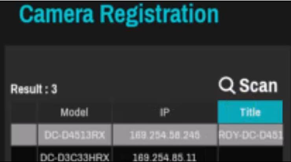
If you want to display the IP addresses of the cameras, click 'Title' once to interchange MAC to IP at the Camera Registration list.
|
|||
| 40 | Video Recorder | Q. A brief description of the events related to recording in NVRs. | 2021-05-31 |
|
A.
1. Video Loss: An event that occurs when no image is input(live video session disconnected) because of the camera, network, system, etc. |
|||
| 39 | Video Recorder | Q. Can 5MP cameras connect to TR-4316(R)? | 2020-06-08 |
|
A.
4 and 5 megapixel cameras are not automatically recognized when connected to a TVI recorder, so you must manually select the mode in the camera settings. As a result, half of the maximum channels in a TVI recorder in live view and playback are used. |
|||
| 38 | Video Recorder | Q. What does the LED on the front lesft side of the DR-8364 mean? | 2020-05-20 |
|
A.
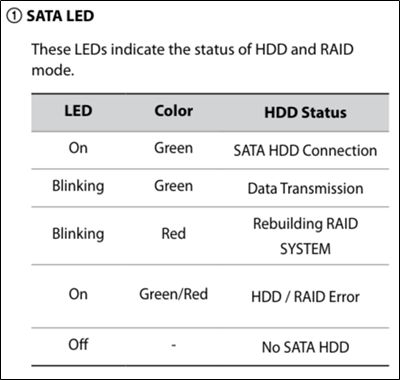
Please refer to the below table. This table is from the Installation Guide.
For reference, the LED draws its signal from 'SATA / RAID controller', not HDD S.M.A.R.T. information. |
|||
| 37 | Video Recorder | Q. Is the number of resolution and camera registration number are different for each NVR model? | 2020-05-12 |
|
A.
The DR-2100 / 2200/4100/4200/6100/6200 series can reduce the number of channels that can be registered when a high-resolution camera is registered. |
|||
| 36 | Video Recorder | Q. What is the difference between 'Auto deletion' and 'Limit Time-Lapse Recording' from NRV recording setup? | 2020-05-12 |
|
A.
Auto Deletion: You can automatically delete all recorded data after a certain period of time. The recorded data is automatically deleted every day at midnight, It will also be deleted if you change the automatic delete setting. Limit Time-Lapse Recording: Among the recorded data that has passed the set days, only the data recorded by the Time-Lapse Recording is automatically deleted. |
|||
| 35 | Video Recorder | Q. Can NVR control HE-1101 while recording streaming from HE-1101? | 2020-05-12 |
|
A.
You can do remote control through IDIS Center after registering HE-1101 from the NVR models below. (As of March 2019) DR-2304P / 6.1.0 or higher |
|||
| 34 | Video Recorder | Q. Can I know who is attempting to login to the NVR remotely? | 2020-05-12 |
|
A.
From the version of NVR below, if the password is wrong during remote access, logs of failed log-ins will be saved. (As of March 2019) DR-1304P / 6.1.0 or higher |
|||
| 33 | Video Recorder | Q. Is there any NVR supporting IPv6? | 2020-05-12 |
|
A.
You can use WAN as IPv6 from the version of NVR below. (As of July 2020) DR-13xxP / 6.1.0 or higher |
|||
| 32 | Video Recorder | Q. The user password of HD-TVI analog recorder is only 8 digits. Can I increase it more than that? | 2020-04-14 |
|
A.
From the version of the recorder model below, the user password can be set up to 16 digits. TDR411 / 1.7.0 or higher |
|||
| 31 | Video Recorder | Q. What are the specifications of DR-2304P's mainboard? | 2020-04-02 |
|
A.
Here are specs for DR-2304P if you need to know the following technical specifications of DR-2304P mainboard for your Project bidding : |
|||
| 30 | Video Recorder | Q. Recorders do not have power switch. Is there any way to turn off the recorders? | 2018-07-17 |
|
A.
The only way to turn off/on the recorders is to plug in/out the power cable. The recorders do not have power switch or a UI on their software to turn off the power. This is to remove a possibility that users accidentally press power switch off or click a power off button, resulting in a recording service halt.
|
|||
| 29 | Video Recorder | Q. How can I find lost password? | 2018-07-12 |
|
A.
A Password is created and encrypted so we cannot tell you what the password was.
We strongly recommend you to either configure SMTP to get verification code or keep User Password Reset File in a USB stick when creating a new password from the initial login.
"Find PW" feature is described in detail in the manuals of DR-8300, 6300, 4300 and 2300 series.
|
|||
| 28 | Video Recorder | Q. How to connect PoE switches to DR-8364? | 2018-07-06 |
|
A.
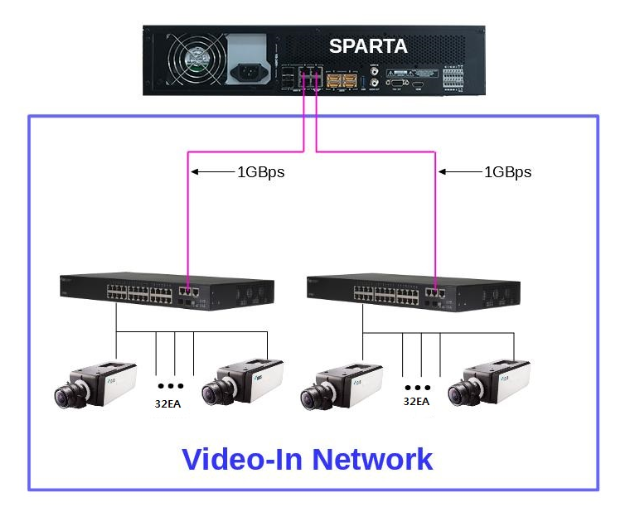
A DR-8364 series NVR has video input ports which consists of two SFP ports and three RJ45 ports.
To prevent too much load on one RJ45 port, please distribute channels onto switches and connect each switch to each different RJ45 port as the image below shows.
Be aware of that connecting more than one RJ45 port to a same switch can create packet loop, so please separate links from each port.
|
|||
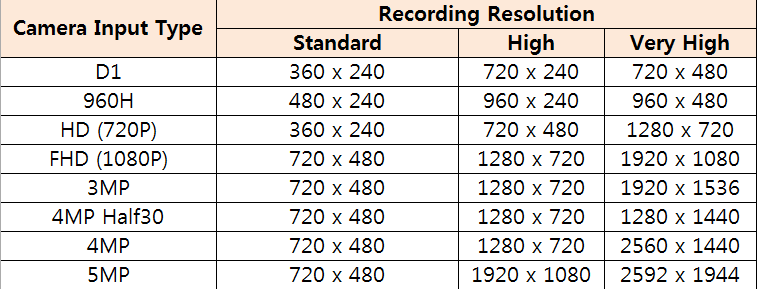
| 27 | Video Recorder | Q. What are the available resolution categories in IDIS TVI recorders? | 2018-07-06 |
|
A.
Please refer to the table below.
|
|||